 WinRadar
Product Research, SEO & Sales Data for Etsy Sellers
Find winning products, rank higher and see real sales — free Chrome extension.
- Free
- No card
- No account required
- Remove any time
- Runs only on etsy.com — every permission explained
WinRadar runs on desktop Chrome
Illustration: on an Etsy search page, WinRadar badges each product card with its organic rank or “Ad” and an estimated monthly sales range, and a side panel shows a verdict, keyword difficulty, demand, competition and price band.
Facts you can check — no inflated user counts
Every number links to where you can verify it.Watch it work on real Etsy pages
- Search pageBadges, verdict, KD, market
- Listing pageSold per window, SEO, 13 tags
- Shop page36-month history, every item
- Product tableSort, filter, export CSV
- DashboardCompetitors, recent sales
One panel. Every Etsy page you research.
Screenshots from the real extension. Short clips of each will replace them.
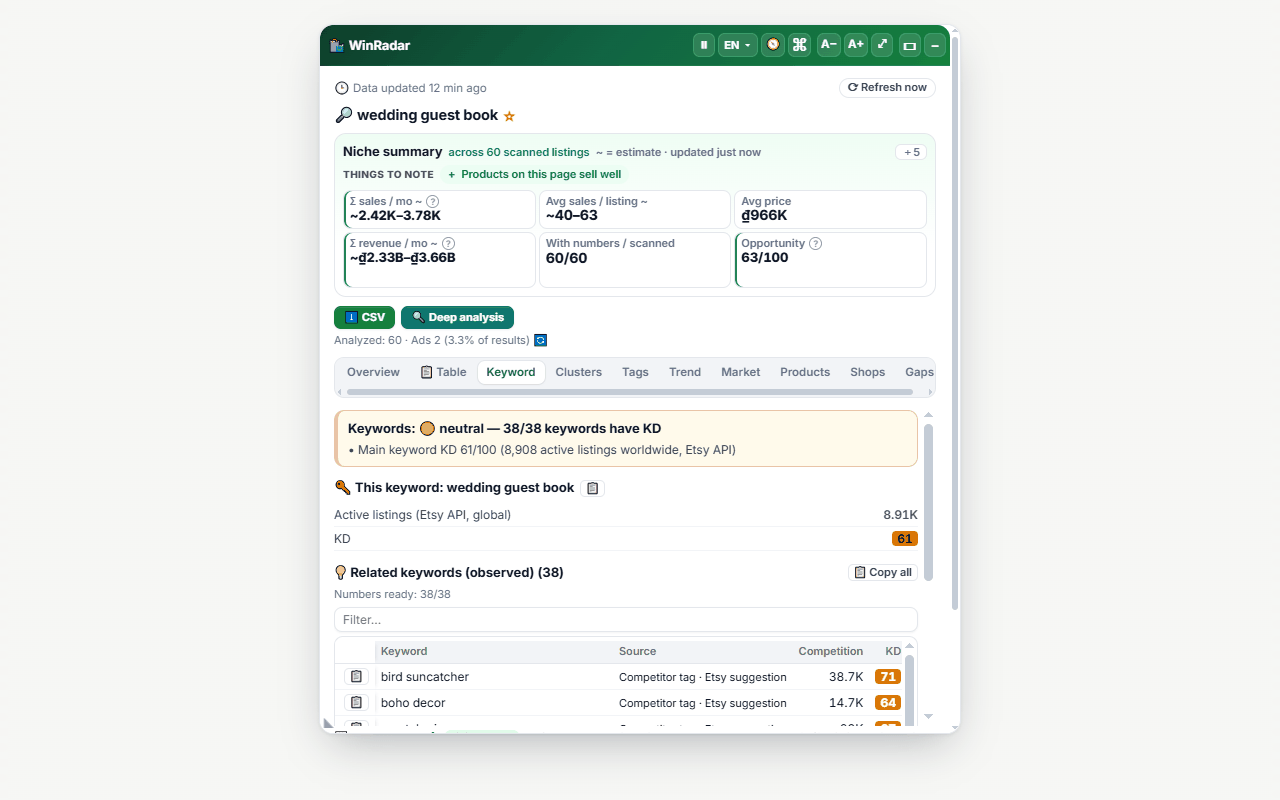
Size up a keyword in one look
- A verdict — Test, Research more, Watch or Saturated — with demand ~, competition, KD and price band
- Every card badged with its organic rank or “Ad”
- Market tab: price bands, discounts, shop-size tiers and how concentrated the top 10 is
- Shops and Tags tabs for everything on the page
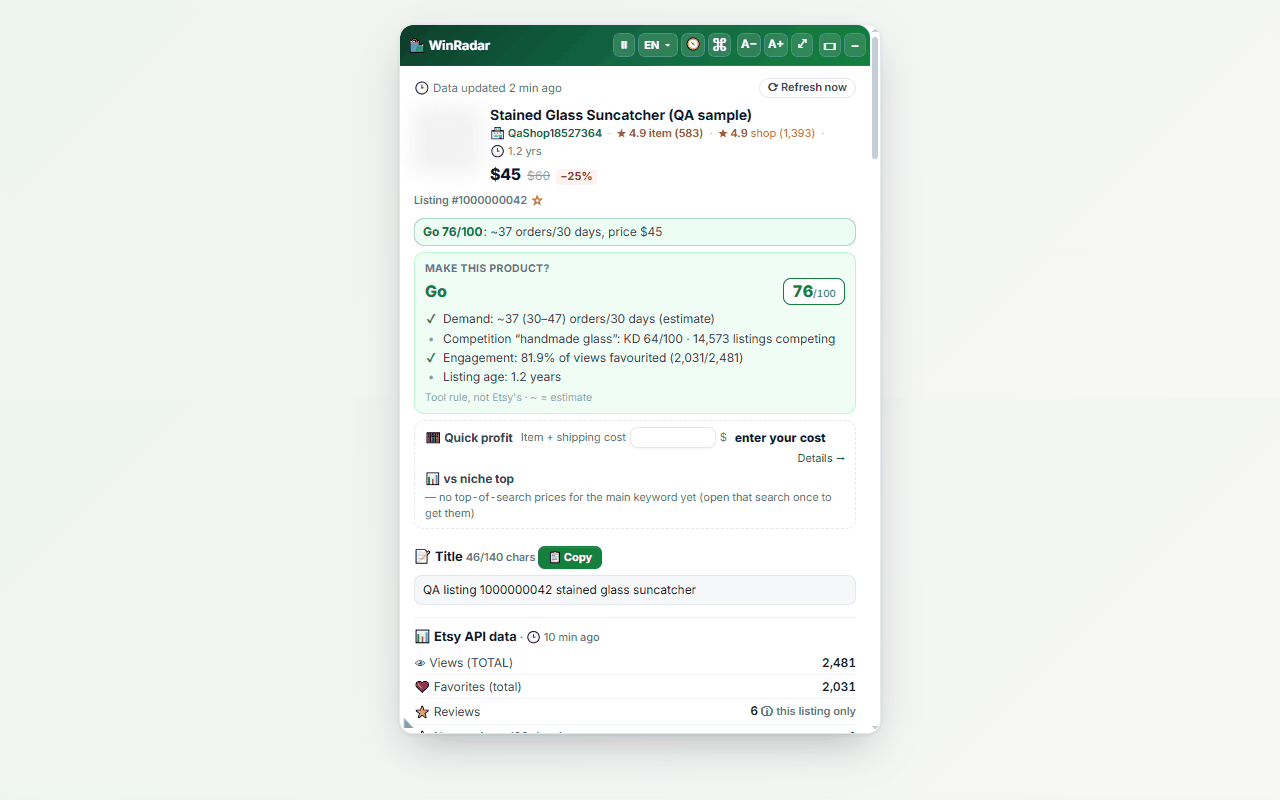
Check a listing before you follow an idea
- Live signals — bestseller, in carts, bought in 24 hours — with history
- Sold per 1, 7, 14, 30, 60 and 90 days
- Title SEO score and all 13 tags with one-click copy
- A listing strategy with the Etsy rule behind each action, and a “Check IP” trademark warning
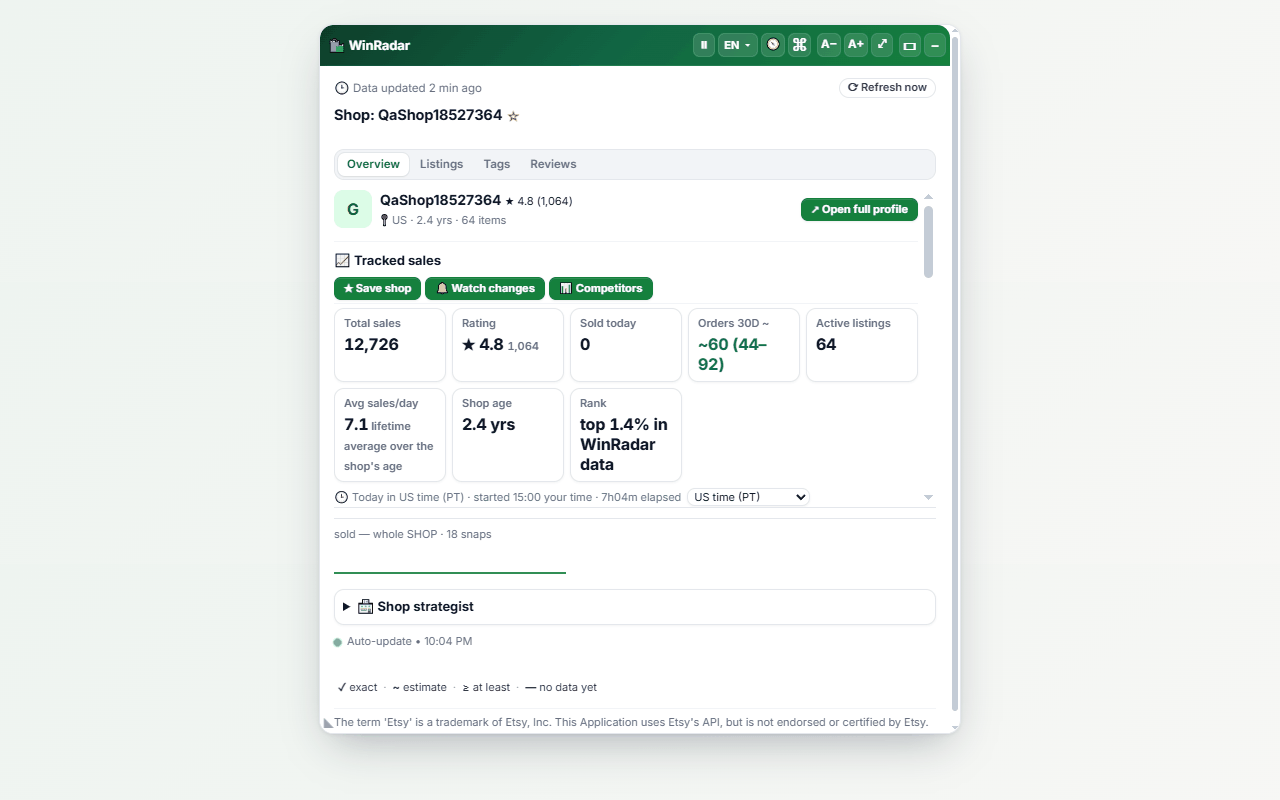
Read a shop's history, not just today
- Sales, reviews, shop age and orders per month as a range
- 36 months of sales history
- Every active item in a sortable table
- A shop strategy and “Should I enter this niche?”
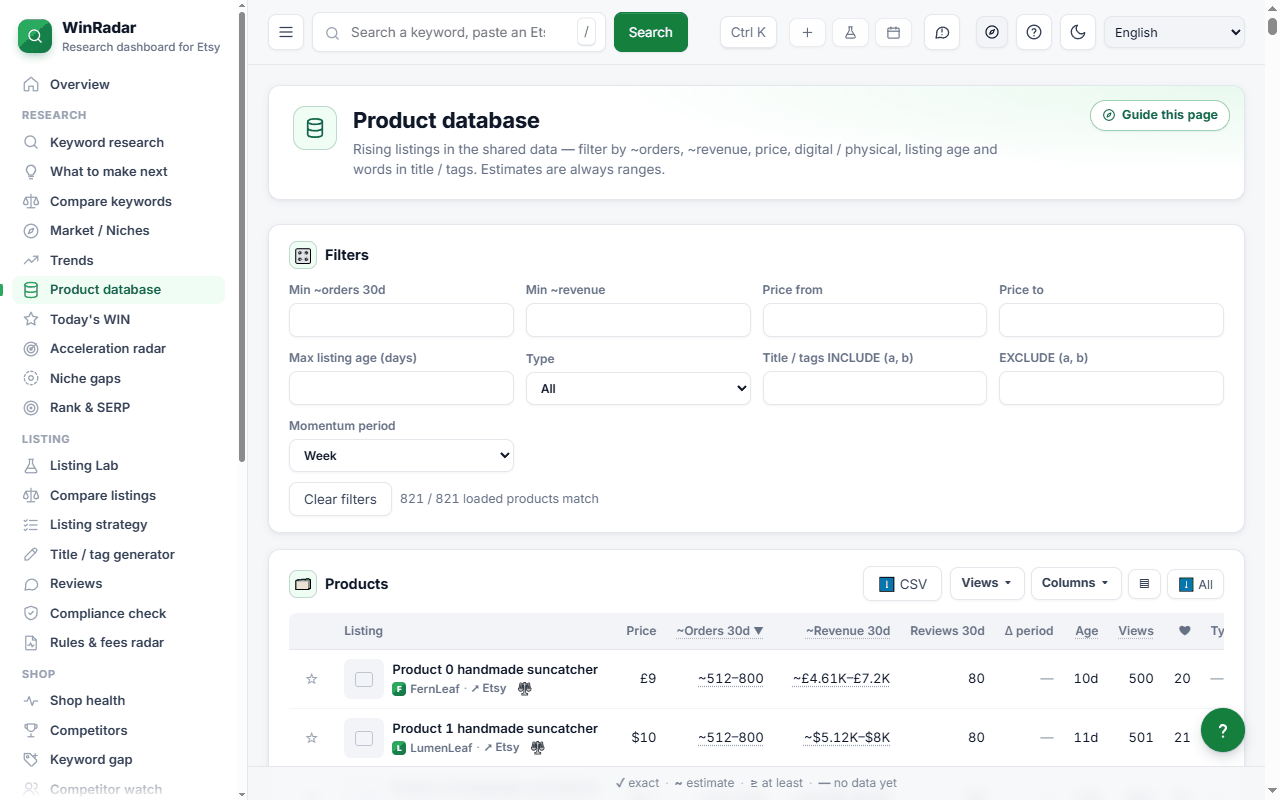
Sort, filter and export a whole results page
- Full screen, every column sortable
- Filters: title words, digital or physical, ads or organic, price, conditions like price<=25
- CSV export
- Keyword folders that turn into a title and 13 tags
Watch competitors and the market over time
- Competitor watch for 20 shops, with alerts on price, sale, listing, tag and photo changes
- Recent sales from the last 48 hours
- Shop rankings by country, category and growth
- Hot listings for any period, and trends
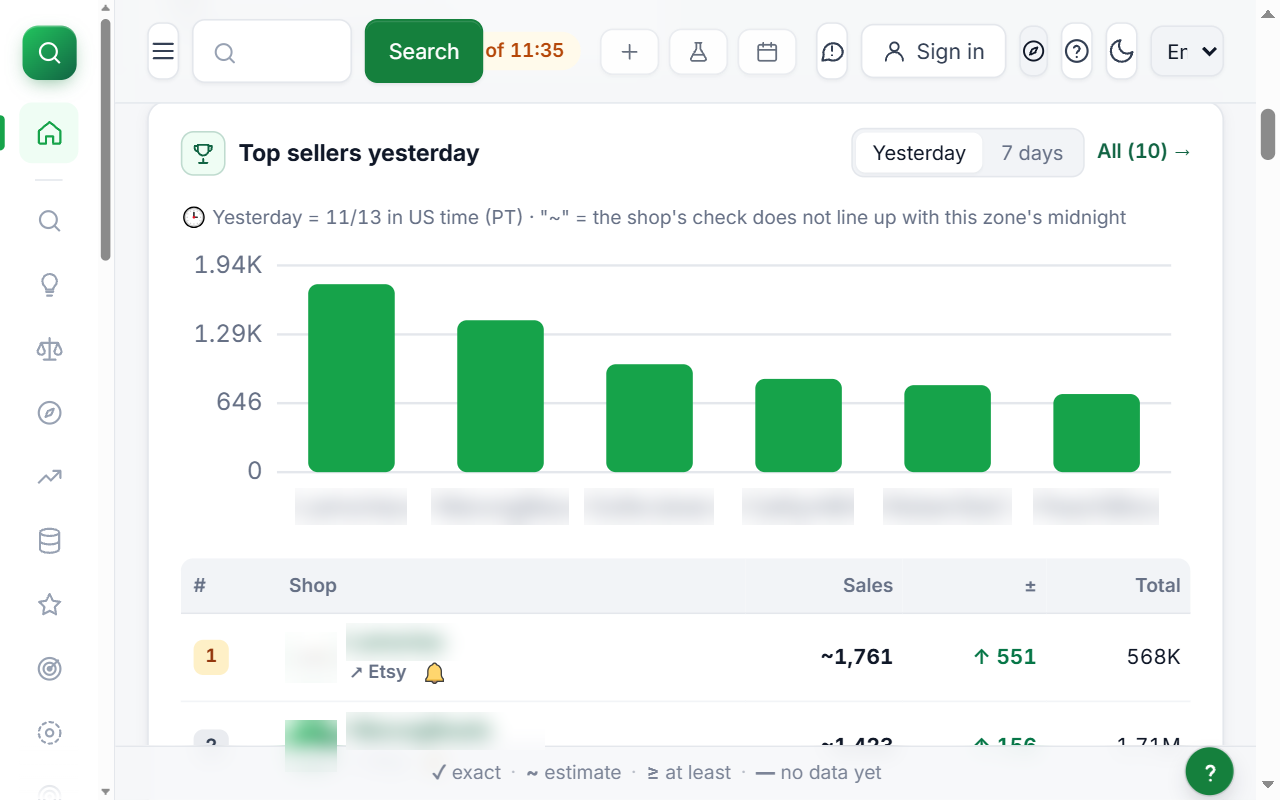 Real screenshot · v4.8.47
Profit, seasons and quick lookup
- Profit per order after Etsy fees
- The next seasonal deadline, with the last day to list
- Quick lookup in the popup, plus shortcuts Alt+Shift+R / W / T
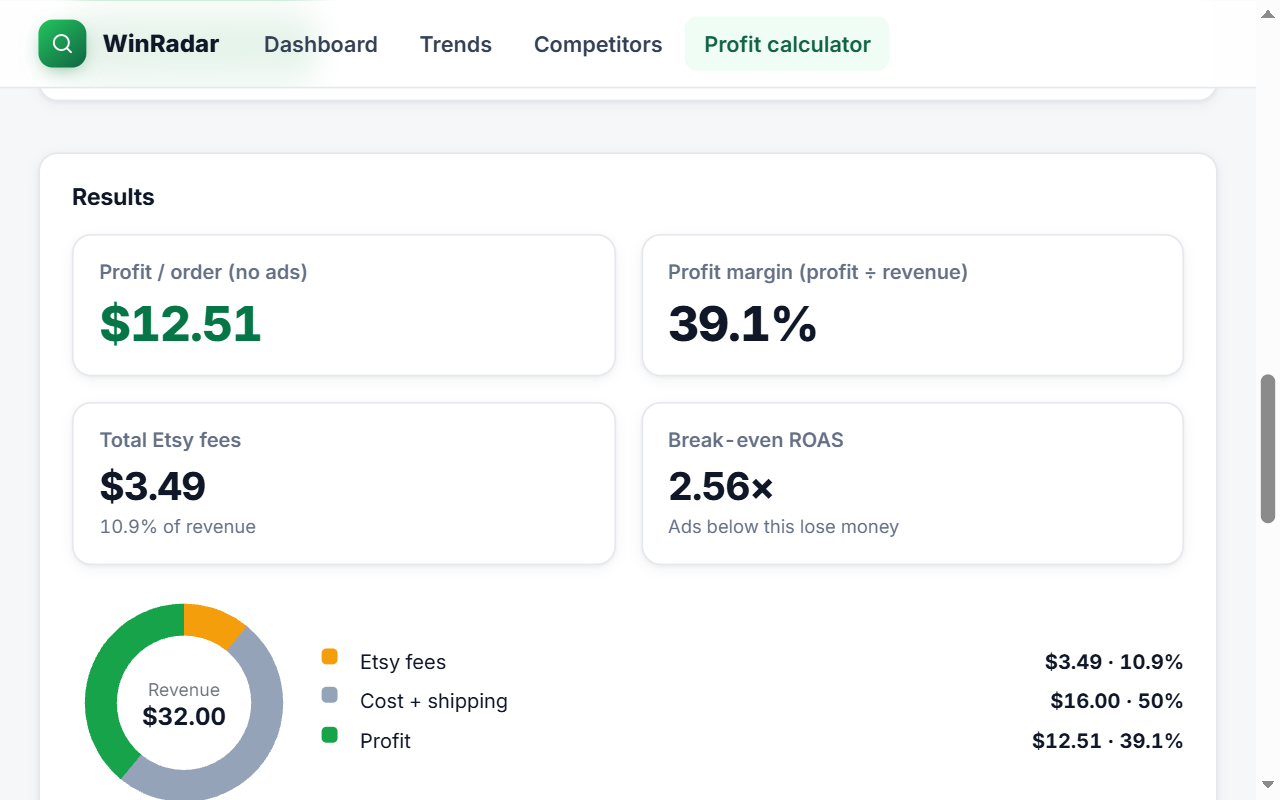 Real screenshot · v4.8.47
Everything WinRadar does — 65 features, nothing hidden
Summary first, details when you open a group. All free.
Etsy search pagesRead a whole market in one look.11
- A badge on every card: organic rank (ads skipped) or “Ad”, shop sales, ~orders and reviews in 30 days
- Share of results that are ads
- Verdict: WIN ✓ / Consider / Not yet, with the steps Test · Research more · Watch · Saturated
- Demand ~, competition, keyword difficulty (KD) that fills in with progress, and price band
- Related searches suggested by Etsy, with demand ~, a 90-day line and 30-day buyers
- Product groups found in titles, with an opportunity score per group
- Tags used by the top listings
- Market: price spread and bands, ads vs organic, discounts, shop-size tiers, 30-day buyers by price band, top-10 concentration
- Every listing and every shop on the page — keeps loading as you scroll, up to 500 items
- Numbers next to Etsy's search suggestions as you type: KD, competition, demand, trend, opportunity
- Suggested price range (P25 · median · P75) and a profit-optimal price ~ once you enter your item cost
Product tableA spreadsheet you don't fill in by hand.5
- Full-screen table (Alt+Shift+T): sort every column, load more listings
- Filters: title words, digital / physical, ads / organic, price range, number conditions like price<=25
- Two ready-made presets for beginners; your filters are remembered
- Export CSV (every row or only visible rows) and save to keyword folders
- Build a title and 13 tags from a folder and copy them in a few clicks
Listing pagesCheck an idea before you follow it.12
- Live signals: bestseller, Etsy's Pick, “in carts”, “bought in 24 hours”, views in 24 hours — with a short history
- Views, favorites, listing age, stock and favorite rate
- Sold per 1 / 7 / 14 / 30 / 60 / 90-day window — bold is exact, “~” is an estimate with a range and confidence level
- ~Sold to date and ~revenue (shown once measured accuracy passes)
- Title SEO score, all 13 tags with one-click copy, tag warnings and keyword coverage in the description
- Similar listings with a match score
- Etsy 2026 ranking-factor score (relevancy · quality · recency · trust), computed on your device
- Listing strategy: the top 3 actions, each with the official Etsy rule behind it; target keywords with KD; suggested tags
- “Check IP” trademark and famous-character warning — risky listings are never rated WIN
- Compliance check, including Etsy's AI rules of 6 Nov 2026, and a “selling well — don't rush edits” warning
- “Make this product?” verdict with quick profit; review summary: strengths, concerns and buyer asks
- Listing price history and a 3-month outlook with a confidence range
Shop pagesHistory, not just today.6
- Sales, reviews, rating, shop age, active listings, reviews in 30 days, ~orders per month (as a range)
- 36-month sales history — measured months first, estimates marked “~”; 24 months of monthly reviews
- Price quartiles, new listings in 30 / 90 days, every shop tag with search, sort and CSV
- Every active item in a sortable table, classed as breakout, rising, top and more
- Shop strategy: grade, key numbers, 3 first actions and “Should I enter this niche?”
- Sales change over 24 hours / 7 days / 30 days, and the hours of the day a shop makes its sales
Dashboard & market watchCompetitors and trends over time.13
- Competitor watch (20 shops): alerts on price changes, sales, new or removed listings, tag and photo edits, new orders and reviews — filter by type, mute any type, kept for 30 days
- Recent sales: sales detected in the last 48 hours for the shops you follow (counts can be ≥), grouped by shop, with a shop filter
- Shop rankings by country, category and growth; a top-seller board by period; CSV of every row
- Hot listings for any period from one day to two years, or your own date range, day by day, with CSV; a WIN list of up to 300 listings
- Acceleration radar: shops and listings selling 2× faster than usual
- Daily keyword · listing position tracking, with an alert on a drop of 10 places or more
- Trends and an off-Etsy trend: interest index, 30-day change and peak months
- Compare up to 4 keywords or 4 listings; analyze 100 keywords in one pass; keyword gap
- “What to make next”: filter by niche, season, price and competition
- Shop health: checks every active listing, scores it and orders the fixes by impact
- Etsy rules, fees & algorithm radar: a timeline with links to official sources and the current fee table
- The Etsy home page as a hub: top 10 shops, rising keywords, today's WIN products, emerging shops, shops selling big today; category and gift pages get an ~orders / revenue table
- Customizable home, saved views, alerts per shop and per listing
Planning toolsProfit and timing decisions.6
- Profit per order after Etsy's published fees, from the costs and shipping you type; a True profit page with the exchange rate filled in
- Worldwide season calendar: 21 markets, lunar and movable dates computed for each year, with an occasion search
- Last day to list (production, SEO ramp-up and shipping included), with reminders 21 days ahead
- Seasonal production plan
- Quick lookup in the popup: paste a keyword, listing link or shop link; shortcuts Alt+Shift+R / W / T; optional right-click menu
- Command palette, and a panel that collapses to a small bar with the key numbers
Your own shop (optional, read-only)Through Etsy's own consent page.3
- Connect your shop through Etsy's consent page (read-only): new orders show right away with real monthly profit; no buyer details collected; compare with your own shop
- Tag helper inside the Etsy listing editor — only suggests replacing weak tags
- ROAS, ACOS and break-even ROAS on the Etsy Ads page — read-only
Languages, account & helpWorks your way.9
- 14 languages with local number and date formats; a display time zone of your choice (US time, your time or UTC)
- Optional sign-in (Google or email) to sync starred keywords, projects, notes, costs, calendar, alerts, rank tracking and followed shops; backup to move computers
- Ask WinRadar (Ctrl/⌘+J): ask in plain words, get answers from WinRadar numbers with citations
- Connect your AI assistant to WinRadar (read-only) Invite-only beta
- Help center: step-by-step tours, a metric glossary and a “?” next to every metric; a 4-step tour on first install
- Report a problem and send feedback inside the tool; optional anonymous error reports (off by default)
- “Delete my data” in one step — on your device and on the server
- A “data as of HH:MM” label when the server is busy; missing numbers always say why; a notice before today's new numbers pause
- The panel follows Etsy page changes without a reload, isn't garbled by Chrome's page translation and remembers its position per page type
Every number tells you what kind of number it is
Etsy doesn't publish orders per listing. So WinRadar never pretends — each figure carries one of three labels.
Measured directly within the last 3 days.
Shop sales today: 7A lower bound — the real number is at least this, for example “N people bought in 24 hours”.
30-day orders: ≥ 12Always with a low–high range and a confidence level.
30 days: ~41 (32–52) · confidence: mediumToday: 3 + ~1Example formats, not real figures.
Test us with your own shop
- Open one of your own listings on Etsy with WinRadar installed.
- Compare WinRadar's numbers with your Shop Manager.
- Off by a lot? Press “Report a problem” in the extension.
What WinRadar can't see
- Private coupons and offers
- Which variation or size sold
- Shipping profit and ad spend
- Anything Etsy doesn't make public
Missing numbers say why — being fetched, queued or still being learned. Never invented.
Accuracy figures by product segment are shown inside the extension.
Installed in 3 clicks. Numbers on your next Etsy search.
Chrome installs extensions only from the Chrome Web Store, so here is exactly what happens.
- 1Click 1
Click “Add to Chrome” here
Opens WinRadar's official Chrome Web Store page in a new tab.
- 2Click 2
Click “Add to Chrome” on the store
Google reviews every extension before it is listed.
- 3Click 3
Click “Add extension”
Chrome shows exactly which permissions WinRadar asks for.
- ✓No click
See numbers right away
A short welcome page opens: accept the terms, then two optional choices (data sharing, anonymous error reports) that you can decline. Then open Etsy or the Dashboard. Sign-in is optional.
Add WinRadar to Chrome — free
Add to Chrome — FreeFree · No card · No account required · Delete your data in one click (Settings › Delete my data)
Opens your own email app. We don't collect your address.
- Desktop Chrome 116 or newer on Windows, macOS, Linux or ChromeOS
- Edge and Brave work too, via the Chrome Web Store
- Runs only on etsy.com — nothing on other sites
- Remove any time: right-click the icon › Remove from Chrome
Every permission, explained.
4 browser permissions, plus access to etsy.com and WinRadar's own server — nothing else. Page content is analysed in your browser. WinRadar never asks for your Etsy password.
We do
- Analyse the Etsy page you open, inside your browser
- Send a random install id and the keyword, listing id or shop name you open — anything more only for features you choose (listed below)
- Let you delete your personal data in one step — on your device and on the server
- Keep optional features — Share page numbers, sign-in, error reports — off until you turn them on
We never
- Read pages outside etsy.com
- Ask for your Etsy password
- Click, type or automate anything on Etsy
- Sell, rent or share your data — no ads, no third-party analytics
| Permission | Why WinRadar needs it |
|---|---|
storage | Keeps your settings, a random install id and a short-lived cache on your computer. |
sidePanel | Opens the quick lookup panel when you click its button. |
alarms | Runs background timers: a clean-up of expired cached data every 15 minutes, updates for the shops and positions you track and, only if you turned them on, sync and shared numbers. |
identity (optional) | Only if you choose “Continue with Google” to sign in (optional). |
https://www.etsy.com/* | Shows the panel on Etsy pages you open and reads what the page already shows. Never clicks, types or automates. |
https://etsy-research-license.seller-insight-vn.workers.dev/*WinRadar's own server (Cloudflare) | WinRadar's own server: read-only numbers. No remote code. |
contextMenus (optional) | Asked only if you turn on the right-click lookup menu; turning it off gives the permission back. |
Read the full privacy policy See our Chrome Web Store privacy disclosure
What WinRadar gives you — compare with named tools
Objective criteria only. The named comparison with every source is on the Compare page.
| Criterion | WinRadar |
|---|---|
| Sales numbers on the free plan | Yes — full numbers, free |
| Sign-up needed to see the first numbers | No — install and open Etsy |
| Panel right on the Etsy page | Yes — search, listing, shop |
| Estimates labeled, with a range | Yes — Exact / ≥ / ~ |
| Languages | 14 |
| Every permission explained on the homepage | Yes |
Built in the open — 29 updates since October 18, 2026
Every change is dated and public. Here are the latest.
- New
Keyword and Tag tables: filter by match type (phrase, exact, broad), difficulty and competition; choose, hide and reorder columns, and save your own view.
- New
The popup and panel footer tell you when new numbers on this device are about to pause or have paused for today, with the time they fill in again (nothing extra on normal days).
- New
The "Recent sales" card is redesigned: every sale of the last 48 hours (no cut-off list), back-to-back sales from one shop grouped, a shop filter and a collapsible card.
- New
A new Account page: one-tap or email sign-in in one clean panel, with sync and backup status shown clearly.
Who's behind WinRadar
A real person reads your email.
We're the WinRadar team. We built WinRadar because we were tired of copying ranks, prices and tags by hand. It's free today because we want sellers to trust the numbers first. Email us — a person reads every message.
— The WinRadar team
- Contact
- support@winradar.net
24/7 email support — we reply within 24 hours. - Servers
- Cloudflare
- Building since
- 2026
No reviews here yet — and we won't fake them.
WinRadar is new. Until real users review it on the Chrome Web Store, here's what you can check yourself:
We only ask for honest reviews. We never offer rewards for reviews.
Straight answers
Is WinRadar really free?
Yes — every feature on this site is free today: no card, no trial timer.
Do I need an account?
No. Sign-in with Google or email is optional — only to sync your work between your computers.
Can using WinRadar get my Etsy shop in trouble?
WinRadar only reads pages you open yourself. It never clicks, types or automates anything on Etsy, and never asks for your Etsy password.
Where do the numbers come from?
What's on the page is analysed in your browser. Other numbers — views, favorites, shop sales — are fetched from Etsy by WinRadar's server. Orders per listing are WinRadar estimates, always marked “~” with a range.
How accurate are the estimates?
Every number is labeled Exact, ≥ or ~. Estimates show a low–high range and a confidence level. You can check us against your own Shop Manager.
Is WinRadar made by Etsy?
No. It's an independent tool, not affiliated with or endorsed by Etsy, Inc.
What permissions does it ask for, and why?
Four browser permissions, access to etsy.com and WinRadar's own server, plus one optional menu permission. Each one is explained in the permissions table. Permissions →
Does it slow down Chrome?
It runs only on etsy.com pages, loads numbers in the background and caches them on your device.
Does WinRadar sell my data?
No. No ads, no third-party analytics, no selling, renting or sharing of data.
How do I delete my data or uninstall?
Settings › Delete my data removes your data on your device and on the server in one step. Uninstalling removes everything on your device.
Which browsers and languages are supported?
Desktop Chrome 116 or newer, plus Edge and Brave via the Chrome Web Store. 14 languages.
How do I get help?
Email support@winradar.net or use “Report a problem” inside the extension. 24/7 email support — we reply within 24 hours.
Your next Etsy search, with numbers.
Installs in 3 clicks. Free. No card.